


Tips to Convert Photo to Embroidery Pattern
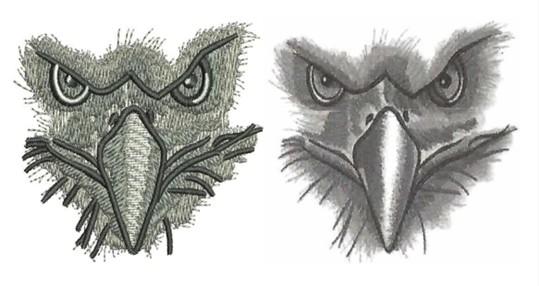
Turning a photograph into an embroidered masterpiece is one of the most rewarding challenges in our craft. It’s where technical skill meets artistic vision, transforming pixels into a tactile, thread-born tribute. Yet, anyone who has tried knows it’s not as simple as clicking a button and loading a hoop. The path from a glowing screen to a stunning stitch-out is paved with crucial decisions that separate a messy, disappointing result from a professional-grade heirloom. Whether you’re personalizing gifts or fulfilling client commissions, mastering the process to convert photo to embroidery pattern is your most valuable skill. Let’s move beyond the basics and into the nuanced techniques that elevate your work.
Photo Selection is Everything
Your final embroidery is only as strong as your source image. Professionals don’t just work with what they’re given; they guide the selection or actively improve it. Seek out or create photos with exceptional contrast and clear, definitive lighting. A portrait with strong directional light that creates distinct shadows on one side of the face will digitize infinitely better than a flat, front-lit smartphone photo. For landscapes or objects, look for compositions with defined edges and distinct color blocks, not busy, blurry backgrounds. If you have control, stage the shot with embroidery in mind. This upfront investment saves hours of digital cleanup and guesswork later. Remember, you’re not just using a photo; you’re interpreting it, and a clear subject makes for a clear interpretation.
Embrace the Power of Pre-Editing in Photo Software
Never feed a raw photo directly into your embroidery software. This is a cardinal rule. First, use a photo editor—even a simple, free one. Your goal here is simplification. Convert the image to grayscale to better evaluate contrast without the distraction of color. Dramatically increase the contrast and adjust the brightness to blow out unimportant background details and deepen key shadows. Use the posterize or cutout filter to see how the image breaks down into 3-5 distinct tonal layers. This pre-editing step forces you to see the photo not as a picture, but as a potential map of light and dark areas, which is exactly what you’ll be building with thread. You’re doing the artistic simplification work upfront, making the digitizing step a translation, not a creation from chaos.
Color Reduction: Think in Thread, Not Pixels
A photograph can contain millions of colors. Your thread palette cannot. The professional secret isn’t to match every hue, but to imply them. Before you digitize a single stitch, decide on a limited color palette—often 5 to 8 threads for a portrait, sometimes fewer. Then, in your photo editor, manually map the photo’s tones to your chosen thread colors. Which dark brown will serve as the deepest shadow? Which mid-tan will become the base skin tone? By making these decisions early and applying them to your pre-edited photo, you create a clear guide for yourself. This method prevents the common pitfall of letting auto-digitizing software pick 20 shades of beige, resulting in a noisy, overworked stitch-out. You maintain artistic control and ensure the final piece has cohesive, intentional color storytelling.
Manual Digitizing: The Only Path to Professional Results
Let’s be unequivocal: for professional quality, auto-digitize functions are a starting point at best and a trap at worst. They create a scatter of stitches with no understanding of fabric, texture, or subject. The professional tool is manual digitizing. This means using your software’s tools to hand-draw the stitch areas over your prepared photo.
Start with the underlay. Think of it as the foundation of a building. For large fill areas, a soft, open-weave underlay like a lattice stabilizes the fabric and provides a base for top stitches to sit on, preventing sagging and distortion. Then, work in layers, from background to foreground. Use different stitch types purposefully: a satin stitch for crisp lines and borders, a directional fill for large areas (angling stitches to follow the contour of a cheek, for instance), and perhaps a delicate run stitch for the finest details. Each click of your mouse places a stitch point, giving you total command over how the thread will flow.
Mastering Stitch Direction and Density for Realism
This is where the magic of realism happens. Stitch direction is your primary tool for creating shape and form. When filling a face, don’t let all stitches run vertically. Curve them around the cheekbone or forehead to model the contour of the skull. In a floral photo, have stitches radiate from the center of a flower. This directional shading with thread mimics how light plays across a surface.
Density is your volume knob. Too high a density creates a stiff, cardboard-like patch. Too low, and the fabric shows through, looking sparse. Vary your density strategically. Use a slightly higher density in focal points (like the eyes) and a lighter density in peripheral areas. This creates visual depth and a more comfortable, flexible finished piece. A professional knows the exact density range their specific machine and thread perform best at, and they stick to it.
The Critical Importance of Sequencing and Pathing
How the machine travels from one stitched section to another is called pathing. Poor pathing leads to excessive jumps, thread trims, and a messy back. Plan your stitch sequence logically. Generally, you stitch from the bottom layer up. But also think about color. Group all areas that use the same thread color together, even if they are in different parts of the design, to minimize color changes. Clean pathing minimizes machine runtime, reduces thread breaks, and results in a cleaner, more professional backside of the embroidery—a detail clients notice.
The Unskippable Professional Protocol: Test and Refine
No professional sends a new pattern straight to a final garment. The test stitch-out is sacred. Hoop the exact same fabric and stabilizer you’ll use for the final product. As it stitches, take notes. Does an area pucker? You may need pull compensation. Does a detail get lost? Adjust the density or use a different stitch type. Does a color look wrong? Switch the thread. This physical sample is your true guide. You will then return to the digital file, adjust, and test again. This iterative process is not a sign of failure; it is the hallmark of a professional committed to quality. It’s the step that ensures when you finally stitch on that special item, it will be perfect.
Converting a photo to an embroidery digitizing is a journey of transformation. It demands that you become both editor and artist, technician and storyteller. By meticulously preparing your image, taking fearless control of the digitizing process, and respecting the crucial test-refine cycle, you move beyond simple conversion into the realm of creation. Your needle becomes your brush, and thread your paint, allowing you to render memories and images into lasting, tangible art. Now, find that perfect photo, apply these professional principles, and stitch something extraordinary.

 English
 Arabic
 French
 Spanish
 Portuguese
 Deutsch
 Turkish
 Dutch
Dutch
 Italiano
 Romaian
 Portuguese (Brazil)
 Greek
Greek